Yeet — Clean developer caches on your Mac
Yeet
Download
Yeet app icon

Clean developer caches on your Mac.
Know exactly what you delete.

Yeet finds caches from Xcode, npm, Gradle, CocoaPods, Homebrew, Claude Code and more than 10 other tools. Every item shows its path, size and what happens if you delete it — you decide.

Version {{ version }} · {{ requirementEn }}
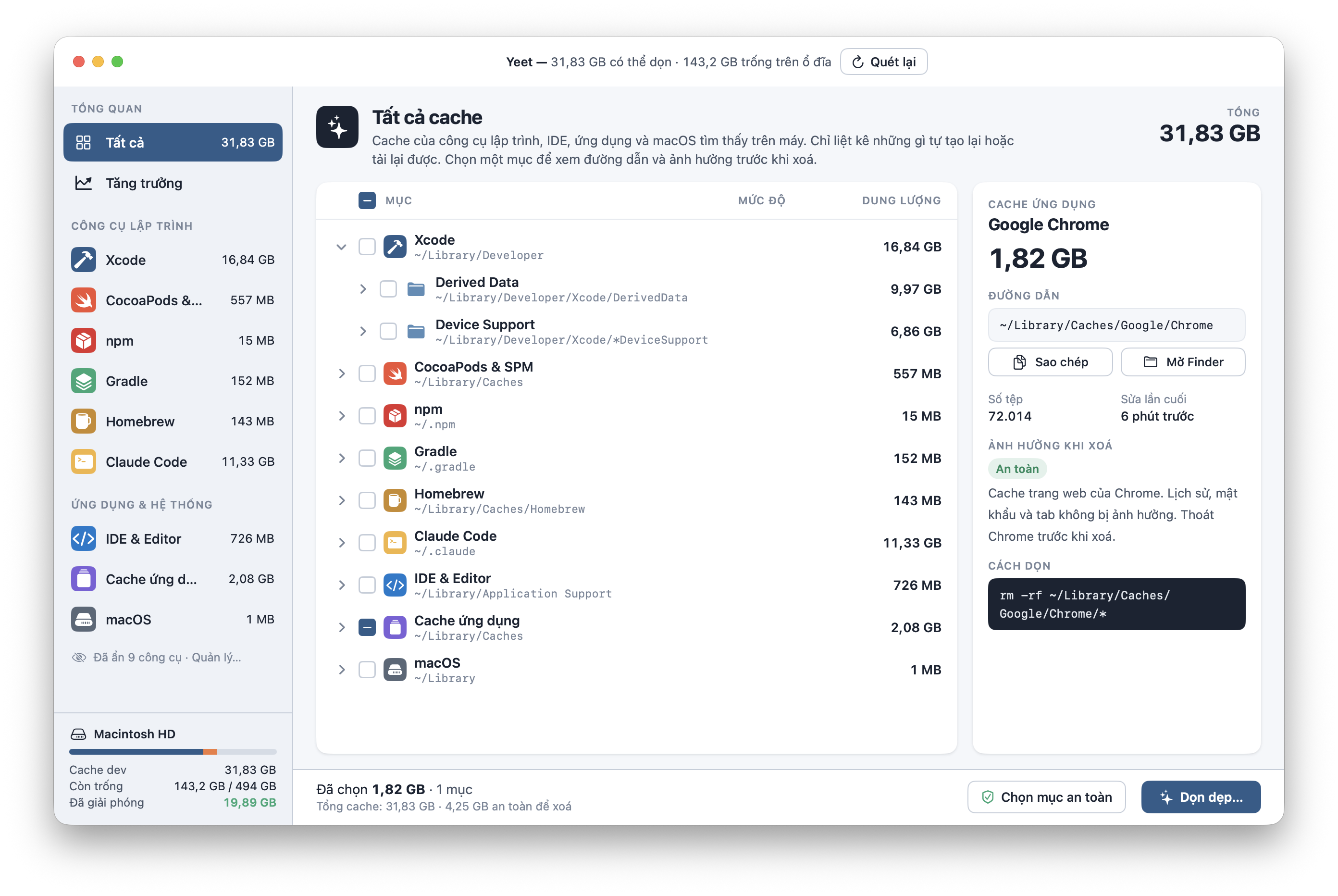
Yeet showing all caches
STEP 1

Scan

Open the app and it scans. Seconds later you see how much you can reclaim and how much space is left on your disk.

STEP 2

Review

Select an item to see its path, file count, last modified time, impact level and the exact command that will run.

STEP 3

Clean

Tick items one by one, or press “Select safe items” to pick only what rebuilds itself. Confirm, then clean.

FEATURES

Few buttons, lots of information.

One window, one list, one clean button. Everything else is there to help you make the right call.

By tool, down to every folder

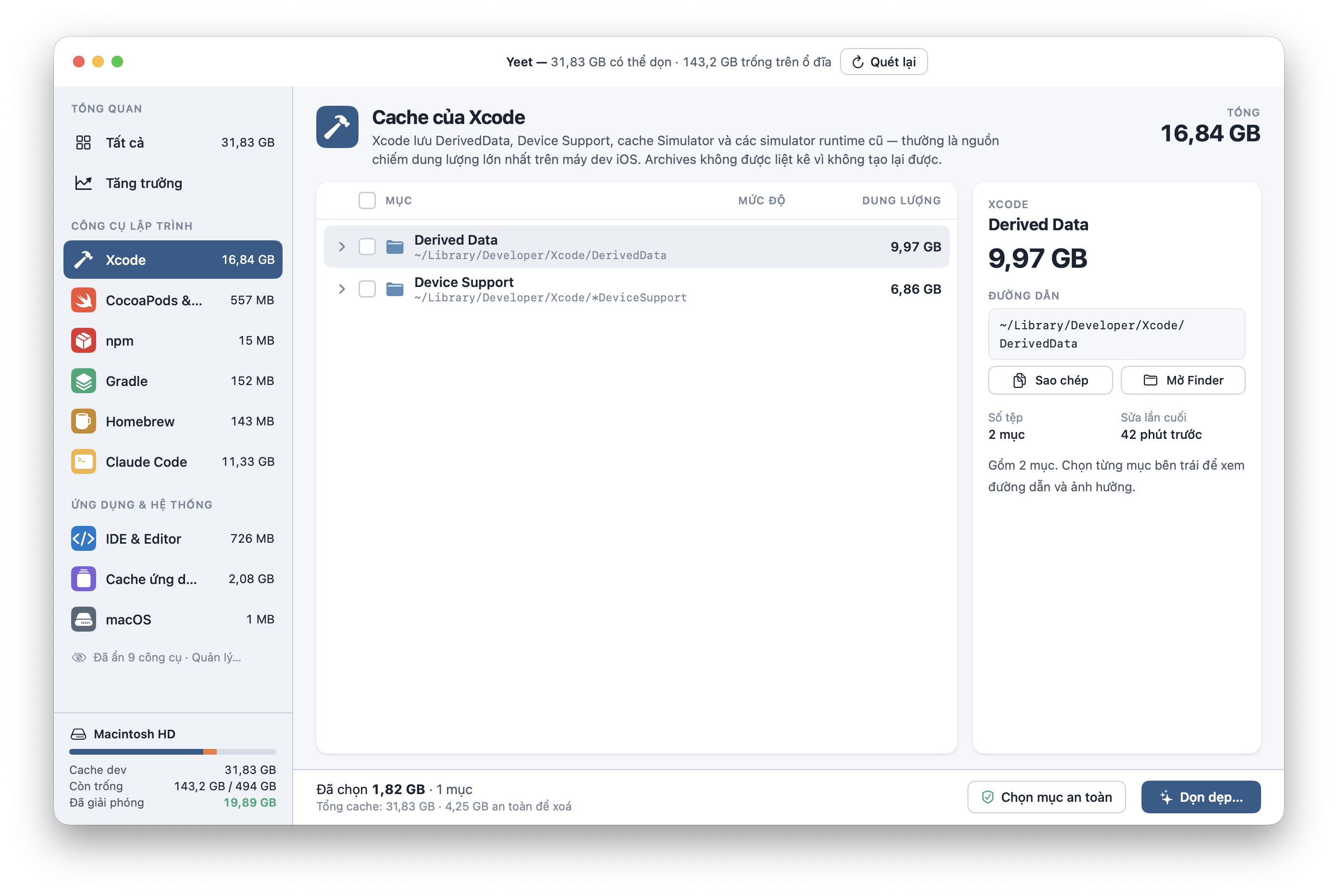
Xcode splits into Derived Data and Device Support. CocoaPods, npm, Gradle, Homebrew, Claude Code, IDEs — each tool gets its own group, with the real paths on your Mac. Xcode Archives are never listed because they can’t be rebuilt.
{{ t }}
Xcode caches in Yeet
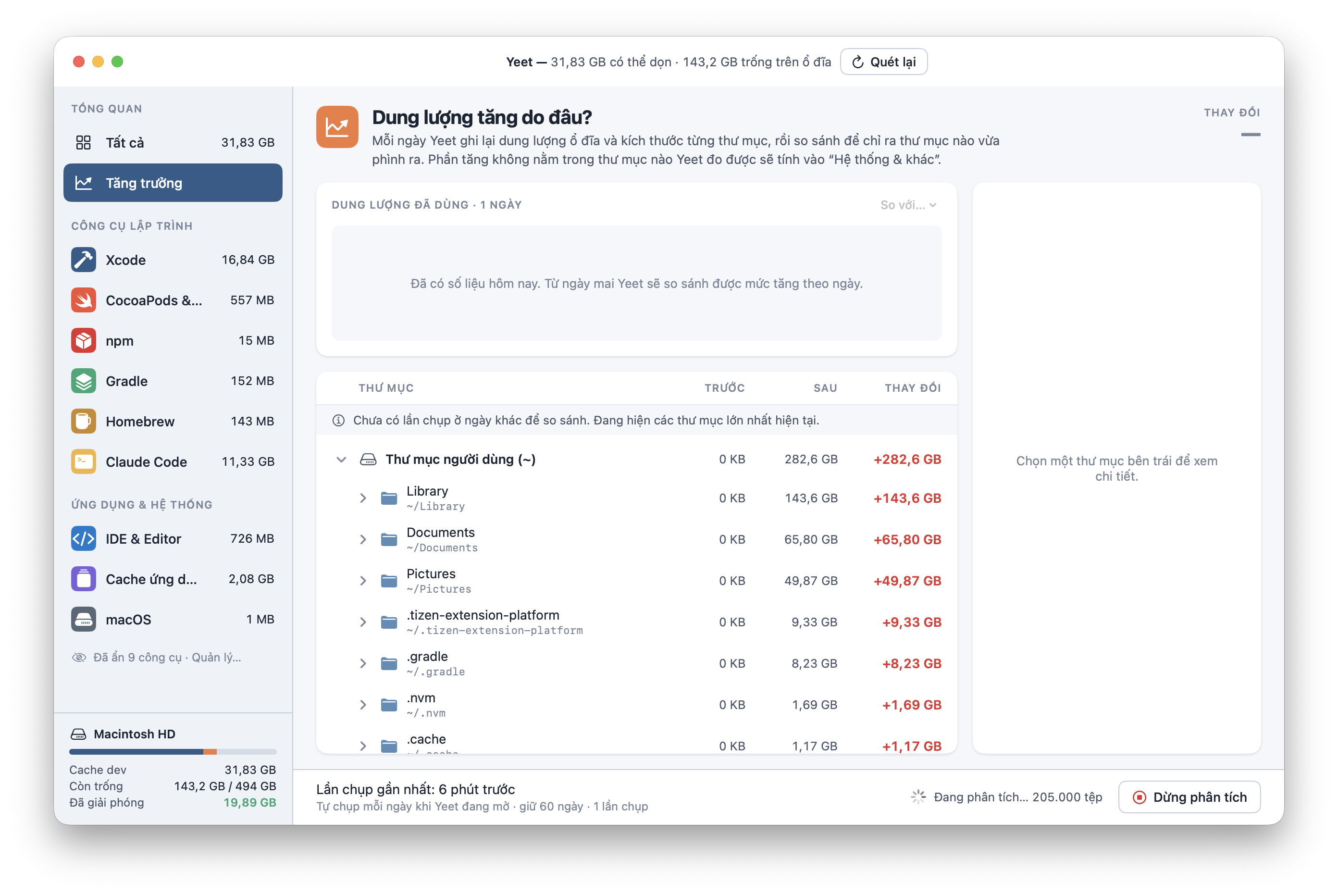
Disk growth view in Yeet

Where did my disk space go?

Every day Yeet records the size of each folder and compares it with the day before, so you can see which folder just grew. History is kept for 60 days, on your Mac.

Yeet can live in the menu bar and notify you when your disk grows past a daily threshold you set.

You decide what Yeet scans

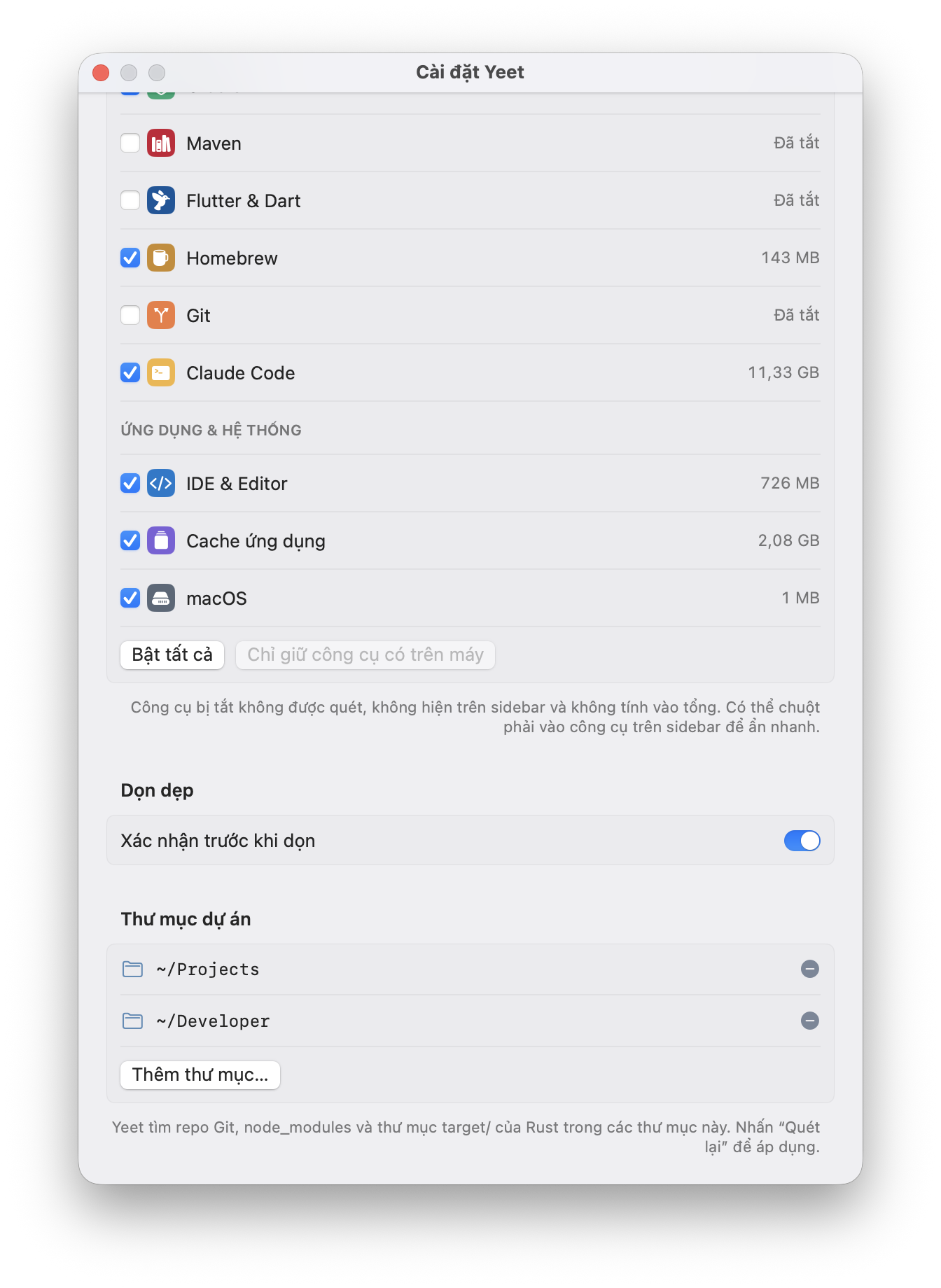
Turn each tool on or off. Disabled tools aren’t scanned and don’t count toward the total. Add project folders to find node_modules, Git repos and Rust target/ folders.

“Confirm before cleaning” is on by default — there’s always one last check.
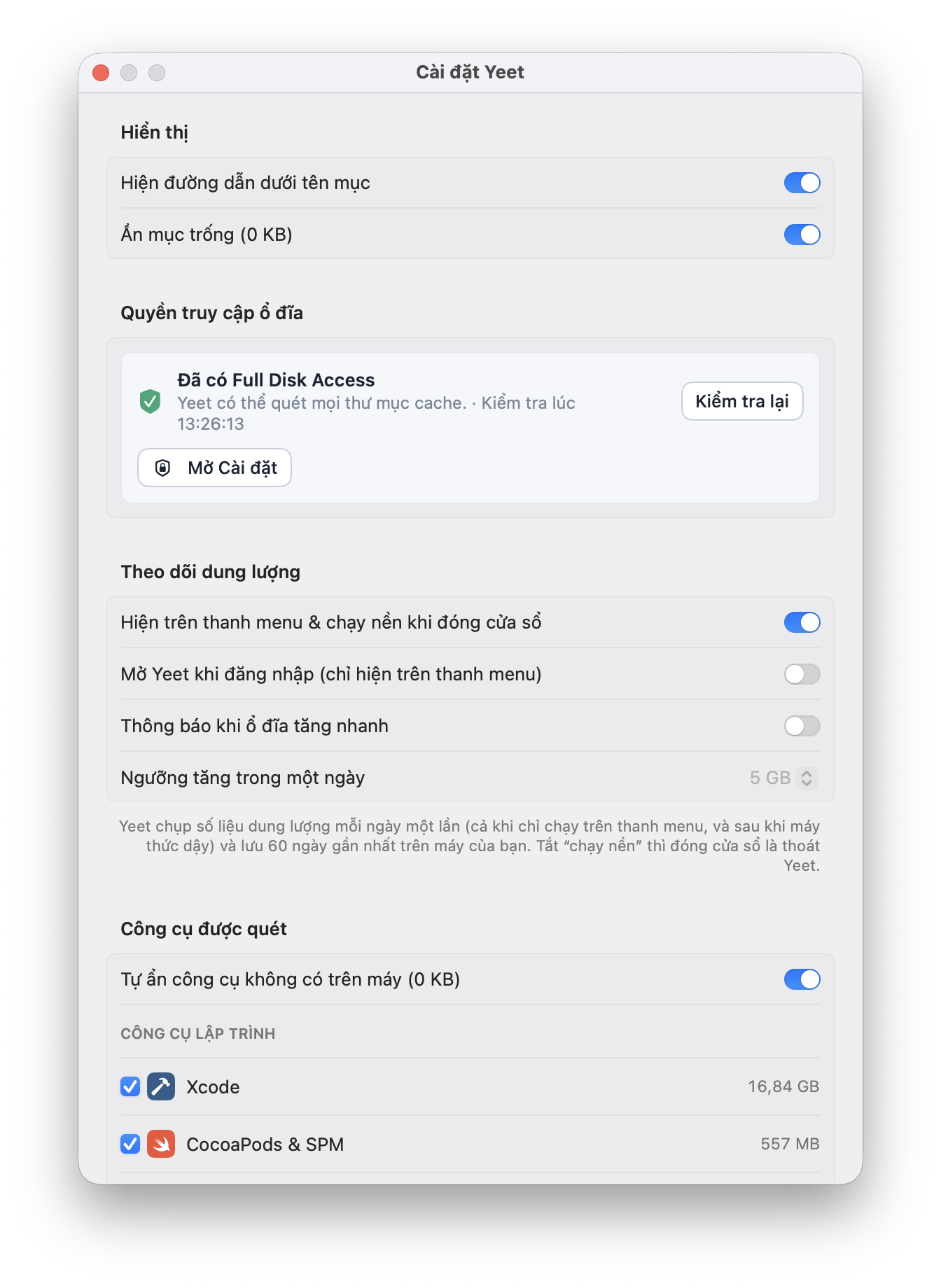
Yeet settings: display, disk access, monitoring Yeet settings: scanned tools, project folders
SECURITY & RISKS

A tool that deletes files should be upfront about it.

Yeet asks for broad access and really deletes files. Here’s what you should know before installing.

Deleting is permanent

Yeet runs the equivalent of rm -rf — files skip the Trash and can’t be recovered. The exact command is always shown under “How to clean” before you press the button.

Requires Full Disk Access

To measure ~/Library and hidden folders, Yeet needs Full Disk Access. That permission allows reading all your files — only grant it if you trust where you downloaded the app. Without it Yeet still runs, but some items will be missing.

Your data stays on your Mac

Yeet only reads folder sizes and modification dates, never file contents. The 60-day size history is stored locally. No account, no analytics sent anywhere.

Only download from this page

An app with Full Disk Access is an attractive target for fake copies. Download from this page and check the SHA-256 at the bottom before opening it.

Quit apps before cleaning

Deleting the cache of a running app (Chrome, Xcode, IDEs) can make it misbehave temporarily. Yeet notes this on each item — read it before you clean.

Revoke access anytime

System Settings → Privacy & Security → Full Disk Access → turn off Yeet. To uninstall, drag Yeet to the Trash.

Impact of deleting

Every item in Yeet carries a label. “Select safe items” only picks the green ones.

{{ r.label }}
{{ r.desc }} Examples: {{ r.ex }}

FAQ

{{ f.q }}

{{ f.a }}

Reclaim tens of gigabytes in a minute.

Download Yeet v{{ version }}

{{ requirementEn }}

SHA-256 {{ checksum }} Verify: shasum -a 256 {{ fileName }}
Yeet
Tải về
Biểu tượng Yeet

Dọn cache dev trên Mac.
Biết rõ mình xoá gì.

Yeet tìm cache của Xcode, npm, Gradle, CocoaPods, Homebrew, Claude Code và hơn 10 công cụ khác. Mỗi mục đều hiện đường dẫn, dung lượng và mức độ ảnh hưởng — bạn quyết định xoá gì.

Phiên bản {{ version }} · {{ requirementVi }}

Màn hình Tất cả cache của Yeet
BƯỚC 1

Quét

Mở app là quét. Vài giây sau bạn thấy tổng dung lượng có thể dọn và dung lượng còn trống trên ổ đĩa.

BƯỚC 2

Xem trước

Chọn một mục để xem đường dẫn, số tệp, lần sửa cuối, mức độ ảnh hưởng và chính xác lệnh sẽ chạy.

BƯỚC 3

Dọn

Tick từng mục, hoặc nhấn “Chọn mục an toàn” để chỉ lấy những gì tự tạo lại được. Xác nhận, rồi dọn.

TÍNH NĂNG

Ít nút, nhiều thông tin.

Một cửa sổ, một danh sách, một nút dọn. Mọi thứ khác là thông tin để bạn quyết định cho đúng.

Theo từng công cụ, tới từng thư mục

Xcode tách thành Derived Data và Device Support. CocoaPods, npm, Gradle, Homebrew, Claude Code, IDE — mỗi công cụ một nhóm, mở ra là thấy đường dẫn thật trên máy. Archives của Xcode không được liệt kê vì không tạo lại được.

{{ t }}
Cache của Xcode trong Yeet
Màn hình Tăng trưởng dung lượng

Dung lượng tăng do đâu?

Mỗi ngày Yeet chụp lại kích thước từng thư mục và so sánh với hôm trước, để chỉ ra thư mục nào vừa phình ra. Số liệu giữ 60 ngày, lưu trên máy bạn.

Có thể chạy trên thanh menu và báo khi ổ đĩa tăng quá ngưỡng bạn đặt trong một ngày.

Bạn quyết định Yeet quét gì

Bật hoặc tắt từng công cụ. Công cụ bị tắt không được quét và không tính vào tổng. Thêm thư mục dự án để tìm node_modules, repo Git và thư mục target/ của Rust.

“Xác nhận trước khi dọn” bật sẵn — luôn có một bước kiểm tra cuối.

Cài đặt Yeet: hiển thị, quyền truy cập, theo dõi Cài đặt Yeet: công cụ được quét, thư mục dự án
BẢO MẬT & RỦI RO

Một công cụ xoá tệp cần được nói thẳng.

Yeet xin quyền rộng và xoá thật. Đây là những gì bạn nên biết trước khi cài.

Xoá là xoá vĩnh viễn

Yeet chạy lệnh tương đương rm -rf — tệp không vào Thùng rác và không khôi phục được. Lệnh chính xác luôn hiện trong mục “Cách dọn” trước khi bạn nhấn.

Cần Full Disk Access

Để đo được ~/Library và các thư mục ẩn, Yeet cần quyền Truy cập toàn bộ ổ đĩa. Quyền này cho phép đọc mọi tệp của bạn — chỉ cấp nếu bạn tin nguồn tải. Không cấp thì Yeet vẫn chạy nhưng sẽ thiếu một số mục.

Dữ liệu ở lại trên máy

Yeet chỉ đọc kích thước và ngày sửa của thư mục, không đọc nội dung tệp. Lịch sử dung lượng 60 ngày lưu cục bộ. Không tài khoản, không gửi số liệu đi đâu.

Chỉ tải từ trang này

Một app có Full Disk Access là mục tiêu tốt cho bản giả mạo. Hãy tải từ trang này và đối chiếu mã SHA-256 ở cuối trang trước khi mở.

Thoát app trước khi dọn

Xoá cache của app đang chạy (Chrome, Xcode, IDE) có thể làm app lỗi tạm thời. Yeet ghi chú điều này ở từng mục — hãy đọc trước khi dọn.

Thu hồi quyền bất cứ lúc nào

Cài đặt hệ thống → Quyền riêng tư & Bảo mật → Truy cập toàn bộ ổ đĩa → tắt Yeet. Gỡ app: kéo Yeet vào Thùng rác.

Mức độ ảnh hưởng khi xoá

Mỗi mục trong Yeet mang một nhãn. “Chọn mục an toàn” chỉ chọn nhãn xanh.

{{ r.label }}
{{ r.desc }} Ví dụ: {{ r.ex }}

Hỏi đáp

{{ f.q }}

{{ f.a }}

Lấy lại vài chục GB trong một phút.

Tải Yeet v{{ version }}

{{ requirementVi }}

SHA-256 {{ checksum }} Kiểm tra: shasum -a 256 {{ fileName }}